
WordPress security is one of the most important aspects of website management, yet it is often overlooked until something goes wrong. Many website owners focus on design, content, and marketing while assuming security can wait. Unfortunately, cybercriminals often target websites that lack basic protection measures.
Whether you run a business website, online store, membership platform, or blog, security should be a top priority. A compromised website can lead to malware infections, downtime, lost revenue, damaged search rankings, and a loss of customer trust.
The good news is that most WordPress security issues can be prevented through regular maintenance, proper hosting, and a proactive security strategy.
In this guide, you'll learn the most important WordPress security best practices that help protect your website, visitors, and business from common threats.
Why WordPress Security Matters
Some website owners believe hackers only target large corporations. In reality, automated attacks constantly scan the internet looking for vulnerable websites of all sizes.
A successful attack can result in:
- Website downtime
- Malware infections
- Data breaches
- Lost search engine rankings
- Blacklisting by Google
- Spam content injections
- Revenue loss
- Damage to your brand reputation
Recovering from a security incident is often far more expensive and time-consuming than preventing one in the first place.
1. Keep WordPress Core Updated
Keeping WordPress updated is one of the easiest ways to improve security.
The WordPress development team regularly releases updates that address:
- Security vulnerabilities
- Software bugs
- Performance improvements
- Compatibility issues
When vulnerabilities become publicly known, attackers often attempt to exploit websites that haven't been updated. Applying updates promptly reduces this risk significantly.
Website owners should include WordPress core updates as part of their regular maintenance routine.
2. Update Plugins and Themes Regularly
Outdated plugins and themes are among the most common causes of WordPress security problems.
Even a single vulnerable plugin can provide attackers with access to your website.
Security best practices include:
- Updating plugins regularly
- Updating themes regularly
- Removing unused plugins
- Deleting inactive themes you don't use
- Using trusted plugins from reputable developers
Professional WordPress maintenance services can help ensure updates are tested and applied consistently while minimizing compatibility issues.
3. Use Strong Passwords and Multi-Factor Authentication
Weak passwords remain one of the easiest ways for attackers to gain unauthorized access.
Every administrator account should use:
- Unique passwords
- Long passphrases
- Password managers
- Multi-factor authentication (MFA)
Multi-factor authentication adds an extra layer of protection by requiring a second verification method in addition to a password.
Even if login credentials are compromised, MFA can prevent unauthorized access to your website.
The Cybersecurity and Infrastructure Security Agency (CISA) recommends multi-factor authentication as one of the most effective ways to protect online accounts.
4. Limit User Access and Permissions
Not every user requires administrator privileges.
Following the principle of least privilege reduces the potential damage caused by compromised accounts or human error.
Regularly review user accounts and:
- Remove inactive users
- Assign appropriate user roles
- Limit administrative access
- Review permissions periodically
Restricting access helps minimize security risks while improving overall website management.
5. Implement a Reliable Backup Strategy
Backups are one of the most important components of WordPress security.
Even well-protected websites can experience:
- Human error
- Plugin conflicts
- Server failures
- Malware infections
- Unexpected data loss
A strong backup strategy should include:
- Automated backups
- Off-site storage
- Backup verification
- Regular restore testing
When a security incident occurs, a verified backup can dramatically reduce downtime and simplify recovery.
6. Choose Secure Hosting Infrastructure
Your hosting environment plays a major role in overall WordPress security.
Quality hosting providers often include security features such as:
- Server-level firewalls
- Malware scanning
- Operating system updates
- Resource isolation
- Performance monitoring
- DDoS protection
Businesses that depend on website performance and reliability often benefit from managed WordPress VPS hosting, which provides dedicated resources, greater control, and stronger security than traditional shared hosting.
While hosting alone cannot fully secure a website, it creates the foundation upon which every other security measure is built.
7. Enable SSL and HTTPS
SSL certificates encrypt data transferred between your website and visitors. Modern websites should always use HTTPS rather than HTTP.
Benefits of HTTPS include:
- Encrypted communication
- Improved user trust
- Better protection of sensitive information
- Support for modern browser security features
- Potential SEO benefits
If your website still loads over HTTP, implementing SSL should be one of your highest priorities.
Google has long encouraged websites to use HTTPS as a security best practice. You can learn more about HTTPS security recommendations in the Google Search Central documentation.
8. Use a Website Firewall
A website firewall acts as a protective barrier between your website and malicious traffic.
Firewalls help block:
- Brute-force login attempts
- Known malicious IP addresses
- Suspicious bots
- Common attack patterns
- Exploit attempts
Adding a firewall can significantly reduce the number of threats that ever reach your website.
9. Scan for Malware Regularly
Malware infections are not always immediately visible. Some malicious code may remain hidden for weeks while collecting data, redirecting visitors, or injecting spam content.
Regular malware scanning helps identify problems before they become serious.
Warning signs of malware can include:
- Unexpected redirects
- Spam pages appearing in search results
- Sudden traffic drops
- Browser security warnings
- Unusual server activity
If malware is detected, prompt WordPress malware removal is essential to prevent further damage.
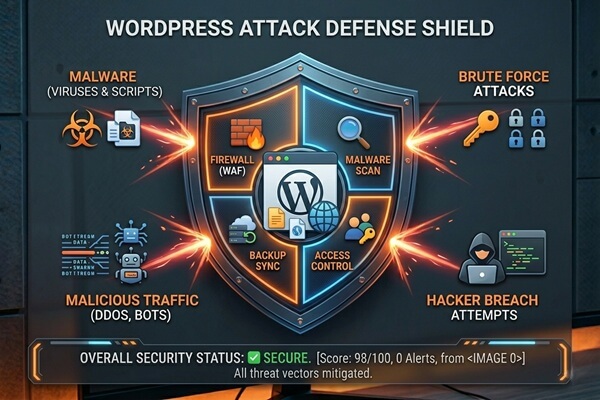
10. Use Cloudflare and Additional Security Layers
Cloudflare can provide an additional layer of protection between visitors and your website.
Security features may include:
- DDoS protection
- Bot filtering
- Firewall rules
- Traffic monitoring
- Rate limiting
Combined with secure hosting and proper WordPress maintenance, Cloudflare can help reduce the risk of many common attacks.
11. Monitor Website Activity
Website monitoring allows you to detect problems before they affect visitors.
Important areas to monitor include:
- Website uptime
- Failed login attempts
- User account changes
- File modifications
- Performance anomalies
Early detection often means faster resolution and less damage when security incidents occur.
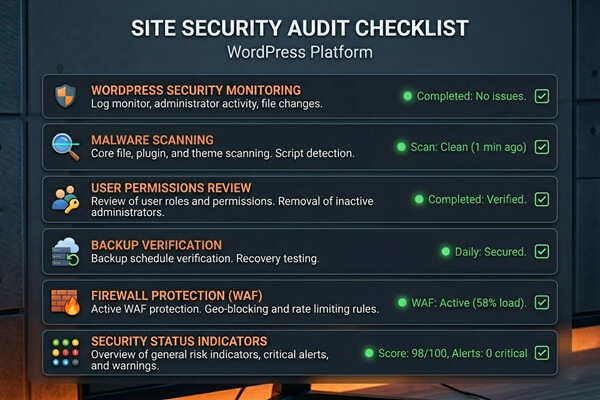
12. Perform Regular Security Audits
Security is not a one-time task. New vulnerabilities emerge constantly, and websites change over time.
Regular security audits help verify that:
- Updates are current
- Backups are functioning correctly
- User permissions remain appropriate
- Security tools are configured properly
- New vulnerabilities are addressed promptly
A proactive approach to WordPress security is significantly more effective than reacting after an attack has already occurred.

3 WordPress Security Quick Wins
- Enable multi-factor authentication
Adding MFA is one of the fastest ways to improve login security and reduce the risk of unauthorized access. - Remove unused plugins and themes
Every unnecessary plugin increases your attack surface and potential security risks. - Verify your backups today
Make sure backups are running successfully and can actually be restored if needed.
WordPress Security Audit Checklist
Use this checklist to evaluate the overall security of your WordPress website.
- WordPress core is fully updated
- All plugins are updated
- All themes are updated
- Unused plugins are removed
- Unused themes are removed
- Strong passwords are enforced
- Multi-factor authentication is enabled
- Regular backups are configured
- Backup restores have been tested
- SSL and HTTPS are enabled
- A website firewall is active
- Malware scanning is performed regularly
- User roles and permissions are reviewed
- Failed login attempts are monitored
- Cloudflare or similar protection is configured
- Website uptime is monitored
- Security audits are performed regularly
WordPress security requires ongoing attention rather than one-time fixes. Professional WordPress maintenance services can help keep your website secure, updated, monitored, and protected against evolving threats.
Final Thoughts
WordPress security is not about a single plugin or security tool. It requires a combination of secure hosting, regular maintenance, strong authentication, backups, monitoring, and proactive protection.
By following the best practices outlined in this guide, website owners can significantly reduce security risks while improving website reliability, visitor trust, and long-term business stability.
Website Optimization & Security
Want to Improve Website Speed and Security?
Proper Cloudflare configuration can improve website performance, caching, security, and traffic filtering significantly. I help businesses optimize WordPress websites, VPS hosting environments, Cloudflare integration, and overall website infrastructure for better speed, security, and long-term stability.
Let’s optimize and protect your website properly.
Frequently Asked Questions
Is WordPress secure?
Yes. WordPress is a secure platform when it is properly maintained, updated regularly, and hosted in a secure environment.
What is the biggest WordPress security risk?
Outdated plugins, weak passwords, and neglected website maintenance are among the most common causes of security incidents.
Do I need a security plugin for WordPress?
A security plugin can provide additional protection, but it should be part of a broader security strategy that includes updates, backups, secure hosting, and monitoring.
How often should I perform a WordPress security audit?
Most business websites should review security settings monthly and conduct a more comprehensive audit at least quarterly.
Can website security affect SEO?
Yes. Malware infections, downtime, hacked content, and browser security warnings can negatively impact rankings, traffic, and user trust.