
Technical SEO for WordPress is one of the most important yet often overlooked aspects of website optimization. Many website owners focus heavily on content creation and keyword research but neglect the technical foundation that helps search engines crawl, index, and understand their websites effectively.
Even the best content may struggle to rank if your website suffers from slow loading times, indexing problems, crawlability issues, poor website architecture, or technical errors.
Technical SEO ensures that search engines can efficiently access your website while providing users with a fast, secure, and seamless experience.
In this guide, you'll learn the most important technical SEO optimizations for WordPress websites and discover how they can improve search visibility, user experience, and long-term website performance.
What Is Technical SEO for WordPress?
Understanding technical SEO for WordPress helps website owners build a stronger foundation for long-term organic growth.
Technical SEO refers to the process of optimizing a website's infrastructure so that search engines can crawl, index, and understand its content more effectively.
Unlike on-page SEO, which focuses on content and keywords, technical SEO deals with the behind-the-scenes elements that affect website performance and search engine accessibility.
For WordPress websites, technical SEO typically includes:
- Website speed optimization
- Core Web Vitals improvements
- XML sitemap management
- Indexing and crawlability optimization
- Mobile usability
- HTTPS implementation
- Structured data markup
- Internal linking architecture
- Canonical URL management
- Website security
When these elements are properly configured, search engines can process your website more efficiently, which often contributes to stronger rankings and improved user engagement.
Why Technical SEO Matters for WordPress Websites
Search engines want to deliver the best possible experience to users. If a website loads slowly, contains broken pages, creates crawling difficulties, or presents technical obstacles, it may struggle to achieve its full ranking potential.
Technical SEO helps:
- Improve crawl efficiency
- Increase indexation quality
- Enhance website speed
- Support better user experience
- Reduce technical errors
- Strengthen website security
- Improve Core Web Vitals metrics
Google's own Search Central documentation consistently emphasizes the importance of technical website quality for search performance.
For WordPress websites, technical SEO is particularly important because the platform relies on themes, plugins, databases, and dynamic content generation, all of which can affect website performance if not properly managed.
1. Optimize Website Speed and Performance
Website speed is one of the most important technical SEO factors.
Slow-loading websites often experience:
- Higher bounce rates
- Lower user engagement
- Reduced conversion rates
- Poor Core Web Vitals scores
Many WordPress performance problems are caused by:
- Excessive plugins
- Poor-quality hosting
- Large images
- Unoptimized databases
- Heavy page builders
- Inefficient themes
Improving website speed often starts with proper hosting infrastructure. Businesses running high-traffic websites frequently benefit from managed WordPress VPS hosting, which provides dedicated resources and greater control over performance optimization.
Additional improvements may include:
- Image compression
- Browser caching
- Server-side caching
- Database optimization
- Cloudflare integration
- Code minification
Professional WordPress optimization services can help identify and resolve many of these performance bottlenecks.
2. Improve Core Web Vitals
Many technical SEO for WordPress improvements focus directly on user experience and website performance.
Core Web Vitals are Google's performance metrics that measure real-world user experience.
The three primary metrics are:
- Largest Contentful Paint (LCP)
- Interaction to Next Paint (INP)
- Cumulative Layout Shift (CLS)
According to Google's Core Web Vitals documentation, these metrics help evaluate how users experience website performance.
Common WordPress issues that negatively affect Core Web Vitals include:
- Large unoptimized images
- Render-blocking resources
- Excessive JavaScript
- Poor hosting environments
- Third-party scripts
- Improper font loading
Improving Core Web Vitals often results in better user experience and stronger overall website quality.
3. Create and Maintain XML Sitemaps
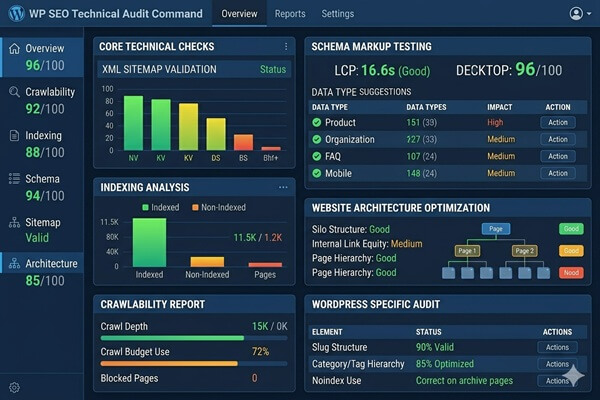
An XML sitemap helps search engines discover and understand your website's content structure.
WordPress SEO plugins typically generate XML sitemaps automatically, but website owners should still verify that their sitemap includes:
- Important pages
- Blog posts
- Categories (when appropriate)
- Custom post types
Your sitemap should generally exclude:
- Duplicate pages
- Low-value archives
- Search result pages
- Private content
After creating or updating a sitemap, it should be submitted through Google Search Console to ensure efficient content discovery.
4. Fix Crawlability Issues
Crawlability refers to a search engine's ability to access and navigate your website.
If Google cannot crawl important pages, those pages may never rank effectively.
Common crawlability problems include:
- Broken internal links
- Incorrect robots.txt rules
- Redirect chains
- Server errors
- Orphan pages
- Blocked resources
Google Search Console is often the best place to identify crawl-related issues.
Regular audits help ensure search engines can efficiently access your most valuable content.
5. Ensure Proper Website Indexing
Even perfectly optimized pages cannot rank if they are not indexed.
WordPress websites occasionally experience indexing problems due to configuration errors.
Common causes include:
- Noindex tags
- Incorrect robots.txt settings
- Canonical tag issues
- Thin content
- Duplicate pages
- Accidental search engine visibility restrictions
One surprisingly common mistake occurs when developers leave the WordPress setting "Discourage search engines from indexing this site" enabled after launching a website.
Regular index coverage reviews in Google Search Console can help detect these issues before they affect rankings.
6. Build a Strong Internal Linking Structure
Internal linking is often considered both a technical SEO and on-page SEO factor.
A strong internal linking structure helps:
- Distribute authority throughout the website
- Improve crawl efficiency
- Help users discover related content
- Strengthen topical relevance
- Support indexation of important pages
For example, an article about website performance may naturally link to services such as WordPress optimization, while security-related content can support pages offering WordPress malware removal services.
Well-organized internal linking creates a logical website architecture that benefits both users and search engines.
In the next section, we'll cover structured data, mobile optimization, HTTPS implementation, canonical tags, website security, and additional technical SEO best practices that help WordPress websites achieve stronger search visibility.
7. Implement Structured Data Markup
Structured data helps search engines better understand the content and purpose of your webpages.
Using schema markup can improve how your website appears in search results and may contribute to enhanced visibility through rich results.
Common schema types for WordPress websites include:
- Organization schema
- Local Business schema
- Article schema
- FAQ schema
- Breadcrumb schema
- Product schema
- Review schema
Many WordPress SEO plugins support structured data implementation, but website owners should regularly validate schema using Google's Rich Results Test tool.
Proper structured data helps search engines better interpret website content and context.
8. Optimize for Mobile Usability
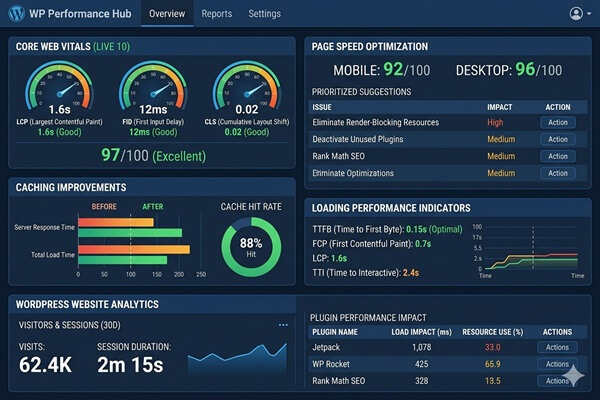
Mobile-first indexing means Google primarily evaluates the mobile version of your website when determining rankings.
As a result, mobile usability has become a critical technical SEO factor.
Your WordPress website should provide:
- Responsive design
- Fast mobile loading times
- Readable text sizes
- Accessible navigation
- Proper touch target spacing
- Mobile-friendly layouts
Many modern WordPress themes are responsive by default, but poor customization or excessive plugins can still create mobile usability problems.
Regular testing across multiple devices helps identify potential issues before they affect user experience.
9. Use HTTPS and Secure Website Infrastructure
Website security is closely connected to technical SEO.
Google has used HTTPS as a ranking signal for years, and users increasingly expect secure browsing experiences.
Every modern WordPress website should:
- Use HTTPS encryption
- Maintain a valid SSL certificate
- Redirect HTTP traffic to HTTPS
- Secure login pages
- Protect against malware and brute-force attacks
Beyond rankings, website security protects user data, business reputation, and website availability.
Regular WordPress maintenance services can help ensure security updates, backups, and monitoring remain properly configured.
10. Manage Canonical Tags Correctly
Canonical tags help search engines understand which version of a page should be considered the primary version.
Without proper canonicalization, WordPress websites may accidentally create duplicate content issues.
Examples include:
- Category archives
- Tag archives
- URL parameter variations
- Pagination duplicates
- HTTP and HTTPS duplicates
Correct canonical tags help consolidate ranking signals and prevent search engines from indexing unnecessary duplicates.
Most reputable SEO plugins automatically generate canonical tags, but they should still be reviewed during technical SEO audits.
11. Monitor and Fix Technical Errors
Technical SEO is not a one-time task.
Even well-optimized WordPress websites can develop issues over time due to updates, plugin conflicts, hosting changes, or website growth.
Common technical problems include:
- 404 errors
- Broken internal links
- Redirect loops
- Server response errors
- Slow database queries
- Indexing anomalies
Regular technical audits help identify these issues before they negatively impact rankings or user experience.
Website owners should periodically review:
- Google Search Console reports
- Crawl statistics
- Core Web Vitals data
- Index coverage reports
- Website uptime monitoring
12. Maintain a Clean and Scalable Website Architecture
Website architecture plays a major role in technical SEO success.
A well-structured WordPress website helps both users and search engines navigate content efficiently.
Good architecture typically includes:
- Logical navigation menus
- Clear content hierarchy
- Well-organized categories
- Internal linking between related topics
- Simple URL structures
- Shallow click depth
As websites grow, maintaining a clean architecture becomes increasingly important for crawl efficiency and user experience.
Businesses running larger websites often benefit from combining optimized architecture with managed WordPress VPS hosting to ensure performance remains consistent as traffic and content expand.
Common Technical SEO Mistakes on WordPress Websites
Many WordPress websites suffer from preventable technical SEO issues.
The most common mistakes include:
- Using low-quality hosting
- Ignoring Core Web Vitals
- Installing too many plugins
- Neglecting website maintenance
- Blocking search engine crawlers accidentally
- Creating duplicate content through archives
- Failing to monitor indexing issues
- Ignoring mobile usability problems
- Not implementing structured data
- Allowing security vulnerabilities to remain unresolved
Addressing these issues often produces faster SEO improvements than publishing additional content alone.
🚀 3 Technical SEO Improvements You Can Make Today
-
Test your Core Web Vitals
Use Google PageSpeed Insights to identify performance issues affecting user experience and rankings. -
Submit your XML sitemap
Verify that your sitemap is available and submitted in Google Search Console. -
Check indexing status
Review your indexed pages in Google Search Console and look for excluded or accidentally blocked content.
Technical SEO Checklist for WordPress
This technical SEO for WordPress checklist can help identify common issues before they affect rankings.
- Website loads quickly
- Core Web Vitals meet Google's recommendations
- XML sitemap is submitted to Google Search Console
- Important pages are indexed
- Internal linking structure is optimized
- Structured data is implemented correctly
- Mobile usability is fully optimized
- HTTPS is properly configured
- Canonical tags are functioning correctly
- Technical errors are monitored regularly
- Website security is actively maintained
- Website architecture supports scalability
Technical SEO issues often go unnoticed until they start affecting rankings and user experience. Professional WordPress optimization services can help identify and fix performance, indexing, and Core Web Vitals problems before they impact your website's growth.
Final Thoughts
Technical SEO for WordPress provides the foundation that allows search engines to crawl, understand, and rank your website effectively.
While content and backlinks remain important ranking factors, technical issues can prevent even the best content from achieving its full potential.
By focusing on website speed, Core Web Vitals, crawlability, indexing, structured data, security, and architecture, businesses can create a stronger foundation for sustainable SEO growth.
Technical SEO is not a one-time project but an ongoing process that evolves alongside your website, hosting environment, and search engine requirements.
Website Optimization & Security
Want to Improve Website Speed and Security?
Proper Cloudflare configuration can improve website performance, caching, security, and traffic filtering significantly. I help businesses optimize WordPress websites, VPS hosting environments, Cloudflare integration, and overall website infrastructure for better speed, security, and long-term stability.
Let’s optimize and protect your website properly.
Frequently Asked Questions
What is technical SEO for WordPress?
Technical SEO for WordPress involves optimizing the technical aspects of a website to improve crawlability, indexation, performance, security, and overall search engine visibility.
Why is technical SEO important for WordPress websites?
Technical SEO helps search engines access, understand, and rank your content more effectively. It also improves website speed, user experience, and website security.
Does website speed affect WordPress SEO?
Yes. Website speed influences user experience, Core Web Vitals metrics, and overall website quality, making it an important component of technical SEO.
What are the most important technical SEO factors?
The most important factors include website speed, Core Web Vitals, crawlability, indexing, XML sitemaps, structured data, mobile usability, HTTPS security, and website architecture.
How often should a WordPress technical SEO audit be performed?
Most websites benefit from a technical SEO audit at least every few months, while larger or rapidly growing websites may require more frequent reviews and monitoring.