
Malware Removal
A hacked or infected WordPress website can quickly become a serious business risk.
Malware not only threatens your data and users, but can also damage your reputation, SEO visibility and hosting stability.
My WordPress malware removal service focuses on fast incident response, deep manual cleanup and long-term security improvements.
Instead of relying on automated plugins alone, every infection is carefully analyzed and removed at both the WordPress and server level.
Whether your site was flagged by Google, suspended by your hosting provider or compromised without warning — I help you restore full control, clean your website and prevent future attacks.
Signs Your WordPress Website Is Hacked or Infected
WordPress malware infections often go unnoticed until serious damage is done.
If your website shows any of the signs below, immediate action is required.
Your WordPress site may be infected if you notice any of the following signs:
For more about how WordPress vulnerabilities are exploited and how to protect your site, see the Sucuri security reports.
WordPress Security Statistics You Should Know
WordPress sites are among the most targeted in the world — around 13,000 hacked per day, adding up to millions each year.
On average, WordPress websites experience thousands of malicious attack attempts every hour from automated bots and exploit scanners.



Example of a Malware Warning Message
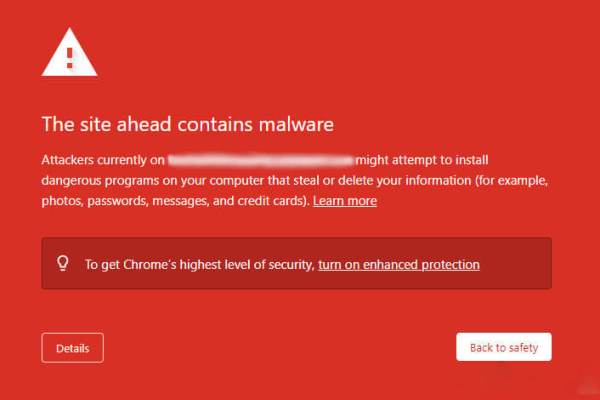
Messages can be different:
"This site may damage your computer"
"Deceptive site ahead"
"The site ahead contains harmful programs"
"The website below contains malicious programs"
Your web browser may display these or similar messages when malware is detected on your website
Many infected WordPress websites are flagged by Google before the owner even notices the problem. This warning immediately destroys user trust and can lead to a dramatic drop in traffic.
Why Hire Me for WordPress Malware Removal?
WordPress malware removal is not just about deleting infected files.
Many infections return because the root cause was never properly identified.
I personally handle every malware cleanup without outsourcing or automated mass tools.
Each case is treated individually, with full analysis at both WordPress and server level.

What’s Included in WordPress Malware Removal
My WordPress malware removal service covers the full cleanup process — from infection analysis to long-term protection.
The goal is not only to remove malware, but to restore trust, security and stability.

WordPress Security Hardening After Malware Removal
Removing malware is only part of the solution.
Without proper security hardening, hacked WordPress websites are often reinfected within days.
Industry tools like Wordfence provide insights into common attack patterns and help administrators block malicious traffic.

How Fast Is WordPress Malware Cleanup?

Response time matters when your website is infected.
In most cases, initial analysis starts within 24 hours after access is provided.
Simple infections can often be cleaned the same day.
More complex cases involving backdoors, injected databases or server-level compromises may take longer.
Malware Removal – Pricing & Guarantee
WordPress malware removal starts from a transparent fixed price:
Standard cleanup: €169
Urgent same-day priority: (+€100)
The price includes manual malware cleanup, security hardening and verification to ensure your website is safe and stable.
Complex infections (large WooCommerce sites, multiple reinfections, severe server compromise) may require additional work. I always confirm the final price before starting.
After cleanup, I can also protect your website with ongoing WordPress maintenance.
Learn about Maintenance →
Malware Removal vs WordPress Maintenance
Malware removal is a one-time emergency service.
WordPress Maintenance Services provide ongoing protection, monitoring and updates to prevent future infections.
Malware Removal
Emergency, one-time service focused on removing existing infections, cleaning hacked files and restoring website security.
WordPress Maintenance
Ongoing service designed to prevent future attacks through regular updates, monitoring, backups and proactive security measures.
If your site is already infected, malware removal is the first step.
To prevent future attacks, ongoing WordPress maintenance is strongly recommended.
Who Needs WordPress Malware Removal
WordPress Malware Removal – FAQ
Can you remove malware from any WordPress site?
Yes, as long as server or hosting access is provided.
Will my website be restored after cleanup?
After malware removal, the site is tested and verified.
Can malware come back?
Yes — without security hardening or maintenance, reinfection is possible.
Do you offer ongoing protection after cleanup?
Yes. WordPress Maintenance Services provide continuous monitoring and prevention.
Do you use plugins only?
No. Malware removal is done manually with professional tools and analysis.
Can I remove WordPress malware myself?
Basic malware can sometimes be removed with plugins, but they rarely eliminate hidden backdoors or the real source of the infection. Professional cleanup ensures the site is fully cleaned and secured against reinfection.

Need Immediate WordPress Malware Removal?
If your WordPress website is hacked or infected, don’t wait.
The longer malware stays on your site, the more damage it causes.