
Website speed plays an important role in SEO, user experience, conversion rates, and long-term website performance.
A slow website can negatively affect search rankings, increase bounce rates, and create a frustrating experience for visitors.
Fortunately, there are many ways to improve WordPress performance and create a faster, more responsive website.
This guide explains practical ways to speed up WordPress website performance, including hosting improvements, caching, image optimization, plugin management, and Core Web Vitals optimization.
If you want to speed up WordPress website loading times, improve Core Web Vitals, and create a better user experience, proper optimization and hosting infrastructure are essential.
How to Speed Up WordPress Website Performance
Improving website speed requires proper hosting, frontend optimization, caching configuration, image compression, and ongoing technical maintenance.
Modern users expect websites to load quickly across both desktop and mobile devices.
Slow-loading websites often experience:
- higher bounce rates
- reduced conversions
- lower engagement
- weaker SEO performance
- poor user experience
Google also uses page experience and performance metrics as ranking signals, which makes website speed optimization increasingly important.
You can learn more in the official Google Web.dev documentation.
Choose Better Hosting
Hosting quality is one of the biggest factors affecting website performance.
Many slow WordPress websites are hosted on overloaded shared hosting servers with limited resources and inconsistent performance.
Poor hosting environments can lead to:
- slow server response times
- resource limitations
- performance instability
- downtime issues
Using properly optimized WordPress VPS hosting provides:
- better server performance
- dedicated resources
- improved scalability
- greater optimization flexibility
Compared to traditional shared hosting, VPS hosting environments are usually much more stable and responsive for WordPress websites.
If you are unsure whether VPS hosting is necessary for your website, you can also read VPS Hosting vs Shared Hosting.
Use a Lightweight Theme
Themes can significantly affect loading speed and frontend performance.
Some WordPress themes include excessive scripts, animations, page builders, and unnecessary features that slow down websites.
A lightweight and well-optimized theme helps reduce:
- page size
- render-blocking resources
- frontend complexity
- JavaScript execution time
Choosing a performance-focused theme creates a stronger foundation for long-term website optimization.
Optimize Images Properly
Large and unoptimized images are one of the most common causes of slow websites.
Image optimization can significantly improve loading performance and Core Web Vitals metrics.
Recommended optimization techniques include:
- compressing images
- using modern formats like WebP
- resizing images correctly
- lazy loading
- serving responsive image sizes
Proper image handling improves both loading speed and mobile performance.
Reduce Unnecessary Plugins
Plugins add functionality to WordPress websites, but too many plugins can negatively affect performance.
Some plugins may:
- load excessive scripts
- increase database usage
- slow down backend performance
- create conflicts
- increase memory usage
Instead of focusing only on plugin quantity, it is more important to evaluate plugin quality and efficiency.
Removing outdated or unnecessary plugins often improves both speed and stability.
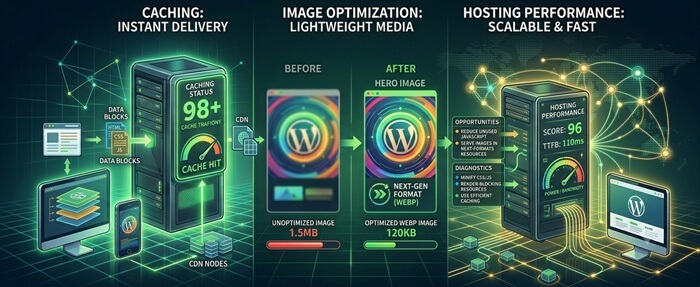
Enable Caching
Caching is one of the most effective ways to improve WordPress performance.
Caching systems reduce the amount of processing required to generate pages dynamically.
Common caching layers include:
- page caching
- browser caching
- object caching
- server-side caching
Proper caching configuration can significantly reduce server load and improve loading times for repeat visitors.
Use a Content Delivery Network (CDN)
A CDN helps distribute website content across multiple global servers.
This allows visitors to load website assets from locations closer to them geographically.
Benefits of CDN integration include:
- faster global loading speeds
- reduced server load
- improved caching
- better scalability
- additional security protection
Services such as Cloudflare are commonly used to improve both website speed and security.
Optimize Core Web Vitals
Google’s performance metrics focus heavily on loading speed, responsiveness, and visual stability.
Improving:
- Largest Contentful Paint (LCP)
- Interaction to Next Paint (INP)
- Cumulative Layout Shift (CLS)
can improve both SEO performance and user experience.
You can also read the detailed guide in Core Web Vitals Explained.
Minify and Optimize Frontend Assets
CSS and JavaScript files can affect rendering speed and page responsiveness.
Optimization techniques often include:
- file minification
- removing unused CSS
- delaying non-critical JavaScript
- combining assets carefully
- reducing third-party scripts
Frontend optimization helps reduce page size and improve rendering performance.
Database Optimization
Over time, WordPress databases can accumulate unnecessary data such as:
- post revisions
- spam comments
- expired transients
- unused plugin data
Database cleanup and optimization help improve backend efficiency and reduce unnecessary overhead.
Keep WordPress Updated
Updates often include performance improvements, security patches, and compatibility fixes.
Keeping WordPress core, themes, plugins, and server software updated helps maintain better website stability and performance.
Regular WordPress maintenance services help keep websites optimized, secure, and properly maintained long-term.
Mobile Optimization Is Essential
Most modern websites receive significant mobile traffic.
A website that performs well on desktop but poorly on mobile may still experience:
- SEO problems
- high bounce rates
- poor user experience
- reduced conversions
Responsive layouts, optimized images, lightweight frontend assets, and efficient hosting all contribute to better mobile performance.
Performance Optimization Is Ongoing
Website performance should be monitored continuously rather than optimized only once.
New plugins, content changes, images, updates, and third-party integrations can all affect loading speed over time.
Regular performance monitoring helps maintain fast loading speeds and stable user experience long-term.
For websites struggling with performance issues, it is also important to understand how website infrastructure affects loading speed. Choosing the right hosting environment can significantly improve stability, scalability, and overall website responsiveness.
You can also read:
WordPress vs HTML Website
and
VPS Hosting vs Shared Hosting.
 5 Website Speed Quick Wins
- Compress large images
Reduce image sizes before uploading to improve loading times without sacrificing quality. - Enable page caching
Caching reduces server processing and helps pages load significantly faster. - Remove unnecessary plugins
Too many plugins can increase database queries and resource usage. - Test Core Web Vitals
Use PageSpeed Insights to identify performance issues affecting user experience. - Use a CDN
Services like Cloudflare can reduce latency and improve loading speed globally.
WordPress Speed Optimization Checklist
- Images are compressed and properly sized
- Page caching is enabled
- Browser caching is configured
- Unused plugins are removed
- Unused themes are removed
- Database optimization is performed regularly
- Core Web Vitals are monitored
- JavaScript and CSS files are optimized
- Lazy loading is enabled for images
- A CDN is configured correctly
- Hosting resources are sufficient for traffic levels
- PHP version is up to date
- Google PageSpeed Insights score is reviewed regularly
Slow websites often suffer from multiple small issues rather than one major problem. Professional WordPress optimization services can help identify bottlenecks affecting performance, Core Web Vitals, and user experience.
Final Thoughts
Improving WordPress performance involves much more than installing a caching plugin.
Hosting quality, frontend optimization, image handling, caching systems, Core Web Vitals, and long-term maintenance all contribute to website speed and stability.
A fast website not only improves user experience, but can also support better SEO visibility, engagement, and long-term business growth.
Optimizing website performance is an ongoing process that requires proper infrastructure, monitoring, and technical management.
Website Performance Optimization
Want a Faster WordPress Website?
Website speed depends on hosting quality, optimization techniques, caching systems, image handling, and long-term technical maintenance.
I help businesses optimize WordPress websites, VPS hosting environments, Core Web Vitals, and overall website performance for better speed and stability.
Let’s improve your website speed and overall performance together.
Frequently Asked Questions
Why is my WordPress website slow?
Common causes include poor hosting, unoptimized images, excessive plugins, slow themes, lack of caching, and outdated software.
Can hosting affect website speed?
Yes. Hosting quality has a major impact on server response times, scalability, and overall website performance.
Does caching improve WordPress speed?
Yes. Proper caching reduces server processing and can significantly improve loading performance and responsiveness.
Can Core Web Vitals affect SEO?
Yes. Loading speed, responsiveness, and page experience metrics can influence search visibility and user experience.
How often should website performance be optimized?
Website performance should be monitored and optimized continuously because plugins, content, scripts, and updates can affect speed over time.