
Website speed and user experience have become extremely important ranking factors for modern websites.
Google introduced Core Web Vitals to help measure real-world user experience and website performance across devices and network conditions.
Understanding these performance metrics is important not only for SEO, but also for improving user experience, conversion rates, loading speed, and website stability.
This guide explains what Core Web Vitals are, how they affect websites, and what can be done to improve them.
Understanding Google Performance Metrics
These Google performance metrics were introduced to evaluate page experience, usability, loading speed, and responsiveness.
These metrics focus on how quickly content loads, how responsive the website feels, and how visually stable pages remain during loading.
The three primary Core Web Vitals metrics are:
- Largest Contentful Paint (LCP)
- Interaction to Next Paint (INP)
- Cumulative Layout Shift (CLS)
Together, these metrics help Google measure real user experience and website quality.
You can learn more about Google’s official recommendations through Google Web.dev documentation.
Why Website Performance Matters
Website performance metrics directly affect both search engine visibility and user experience.
Slow-loading websites, unstable layouts, and delayed interactions can negatively affect:
- SEO performance
- bounce rates
- conversion rates
- user engagement
- overall website usability
Modern users expect websites to load quickly and respond smoothly across mobile and desktop devices.
Even small performance improvements can have a significant impact on business websites and online stores.
Largest Contentful Paint (LCP)
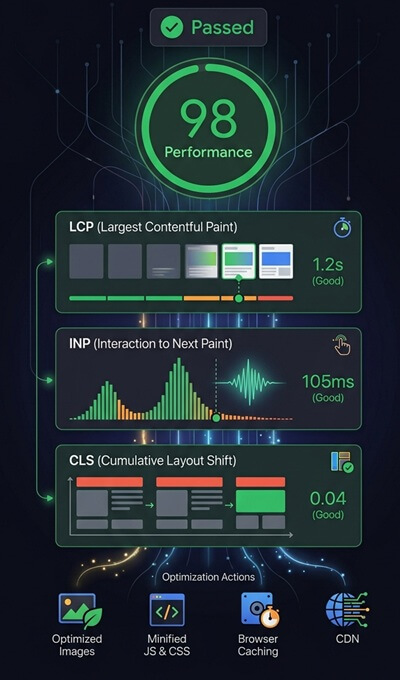
Largest Contentful Paint measures how quickly the main visible content of a page loads.
This is usually:
- a large image
- a hero section
- a featured banner
- large blocks of visible text
Google recommends keeping LCP below:
:contentReference[oaicite:0]{index=0}
Common causes of poor LCP include:
- slow hosting
- large unoptimized images
- render-blocking resources
- slow server response times
- unoptimized themes or plugins
Using properly optimized managed WordPress VPS hosting can significantly improve server response times and loading performance.
Interaction to Next Paint (INP)
Interaction to Next Paint measures how quickly a website responds to user interactions such as clicks, taps, or keyboard input.
This metric replaced First Input Delay (FID) as a more accurate measurement of responsiveness.
Google recommends keeping INP below:
:contentReference[oaicite:1]{index=1}
Poor responsiveness is often caused by:
- heavy JavaScript execution
- excessive third-party scripts
- large frontend frameworks
- unoptimized page builders
Reducing unnecessary scripts and optimizing frontend assets can improve website responsiveness considerably.
Cumulative Layout Shift (CLS)
Cumulative Layout Shift measures visual stability during page loading.
If page elements move unexpectedly while loading, users may accidentally click the wrong buttons or lose their reading position.
Google recommends keeping CLS below:
:contentReference[oaicite:2]{index=2}
Common causes of layout shifts include:
- images without dimensions
- dynamic ads
- late-loading fonts
- improperly sized embeds
Maintaining stable layouts improves both usability and perceived website quality.
How Hosting Affects Website Performance
Hosting quality plays a major role in website speed, responsiveness, and overall page experience.
Low-quality shared hosting environments often suffer from:
- slow server response times
- resource limitations
- performance instability
- high server load
This can negatively affect loading speed, responsiveness, and overall page experience.
Compared to traditional shared hosting, VPS environments provide:
- dedicated resources
- better scalability
- improved server performance
- greater optimization flexibility
You can also read the detailed comparison in VPS Hosting vs Shared Hosting.
How to Improve Website Performance Metrics
Improving website performance usually requires a combination of technical optimization, hosting improvements, and frontend optimization.
Common optimization strategies include:
- image optimization
- lazy loading
- caching systems
- CDN integration
- code minification
- database optimization
- plugin cleanup
- server-level optimization
Professional >website performance optimization often focuses on improving loading speed, responsiveness, and overall user experience.
Mobile Performance Matters More Than Ever
Most websites now receive a large percentage of traffic from mobile devices.
Google primarily evaluates mobile page experience when measuring website performance and ranking signals.
This makes mobile optimization especially important for:
- responsive layouts
- mobile loading speed
- touch responsiveness
- layout stability
A website that performs well on desktop but poorly on mobile may still experience SEO and usability problems.
Performance Optimization Is an Ongoing Process
Website performance is not something that should only be optimized once.
Plugins, themes, third-party scripts, images, and frontend assets continuously change over time.
Without proper monitoring and maintenance, websites can slowly become slower and less optimized.
Regular WordPress maintenance services help keep websites updated, optimized, secure, and stable long-term.
 5 Core Web Vitals Quick Wins
- Run a PageSpeed Insights test
Identify the biggest issues affecting Largest Contentful Paint, Interaction to Next Paint, and Cumulative Layout Shift. - Optimize your largest images
Large hero images are often responsible for poor LCP scores. - Enable page caching
Faster server response times improve user experience and Core Web Vitals performance. - Reduce unnecessary JavaScript
Heavy scripts can negatively affect responsiveness and INP scores. - Check mobile performance
Most Core Web Vitals issues appear on mobile devices first.
Core Web Vitals Audit Checklist
- Largest Contentful Paint (LCP) is under 2.5 seconds
- Interaction to Next Paint (INP) is under 200 milliseconds
- Cumulative Layout Shift (CLS) is below 0.1
- Images are compressed and properly sized
- Hero images use modern formats such as WebP or AVIF
- Page caching is enabled
- Unused JavaScript is minimized
- Unused CSS is removed
- Fonts are optimized and preloaded where appropriate
- Lazy loading is enabled for off-screen images
- Third-party scripts are reviewed regularly
- Mobile performance is tested frequently
- Core Web Vitals are monitored in Google Search Console
Poor Core Web Vitals scores often result from multiple performance issues working together. Professional WordPress optimization services can help identify bottlenecks affecting website speed, user experience, and search visibility.
Final Thoughts
Understanding Core Web Vitals helps website owners improve both SEO and user experience.
Metrics such as loading speed, responsiveness, and layout stability now play an important role in how websites perform in search results and how users interact with pages.
Improving website performance often requires more than plugin installation alone. Hosting quality, frontend optimization, image handling, caching systems, and long-term maintenance all contribute to better performance metrics.
Businesses that invest in website performance optimization often benefit from improved SEO visibility, faster loading speeds, better engagement, and stronger long-term website stability.
Website Performance Optimization
Want Better Website Performance Scores?
Website performance depends on much more than speed testing tools alone.
I help businesses optimize WordPress websites, VPS hosting environments, caching systems, images, and frontend performance to improve loading speed, user experience, and long-term stability.
Let’s improve your website performance and Core Web Vitals together.
Frequently Asked Questions
What are Core Web Vitals?
Core Web Vitals are Google performance metrics that measure loading speed, responsiveness, and visual stability on websites.
Do Core Web Vitals affect SEO?
Yes. Core Web Vitals are part of Google’s page experience signals and can influence website rankings and user engagement.
Can hosting affect Core Web Vitals?
Yes. Slow hosting environments can negatively affect loading speed, server response times, and overall website performance.
How can I improve Core Web Vitals?
Improving Core Web Vitals usually involves optimizing images, caching, hosting, scripts, frontend assets, and overall website performance.
Are Core Web Vitals important for WordPress websites?
Yes. WordPress websites can greatly benefit from proper performance optimization, quality hosting, caching systems, and ongoing maintenance.